When a customer orders from a growing manufacturer, that order has to reach the operations team, the production floor, the stock records, the delivery schedule and the advertising account. In most businesses, that happens by people re-typing the same order into each system. For a UK-based manufacturer we work with, we connected all of those systems so an order is entered once and every other system updates itself — while the decisions that need a person still go to a person. This article follows a single order through that system from checkout to delivery, and explains the decisions that made it reliable enough to run a business on.
What did the business look like before?
The company makes and sells physical products through its own e-commerce store. Some products are held in stock, others are produced to order, and deliveries go out two ways: through their own delivery routes and through a pallet carrier network for larger items. Every one of those steps had its own tool, and the tools were good at their individual jobs. The problem was the space between them. An order placed online had to be copied onto the operations board, checked against stock, turned into a production order, scheduled for delivery, and marked complete once it arrived. Each handoff was a person reading one screen and typing into another. That works at a small volume. As orders grow, it produces the usual symptoms: orders sitting in the wrong status, stock figures nobody fully trusts, customers asking where their delivery is while the team checks three systems to find out, and a lot of skilled people spending their day on data entry.
What was the principle behind the design?
Before connecting anything, we agreed on one rule: each system keeps doing what it’s good at, one place shows the full picture, and nobody types the same information twice. In practice that meant:
- The store remains where orders originate
- An operational hub built on Monday.com becomes the single place where the team sees and manages every order
- The inventory and production system remains the source of truth for stock and production orders
- The delivery systems (routing software and a pallet network) remain the source of truth for what was delivered and when
- The advertising platform receives what actually happened to each order, not just what the website tracked at checkout
The automations, built in n8n, carry information between them. They don’t replace the people making decisions. A production manager still decides when to release a production order; the system just makes sure that decision reaches every place it needs to.
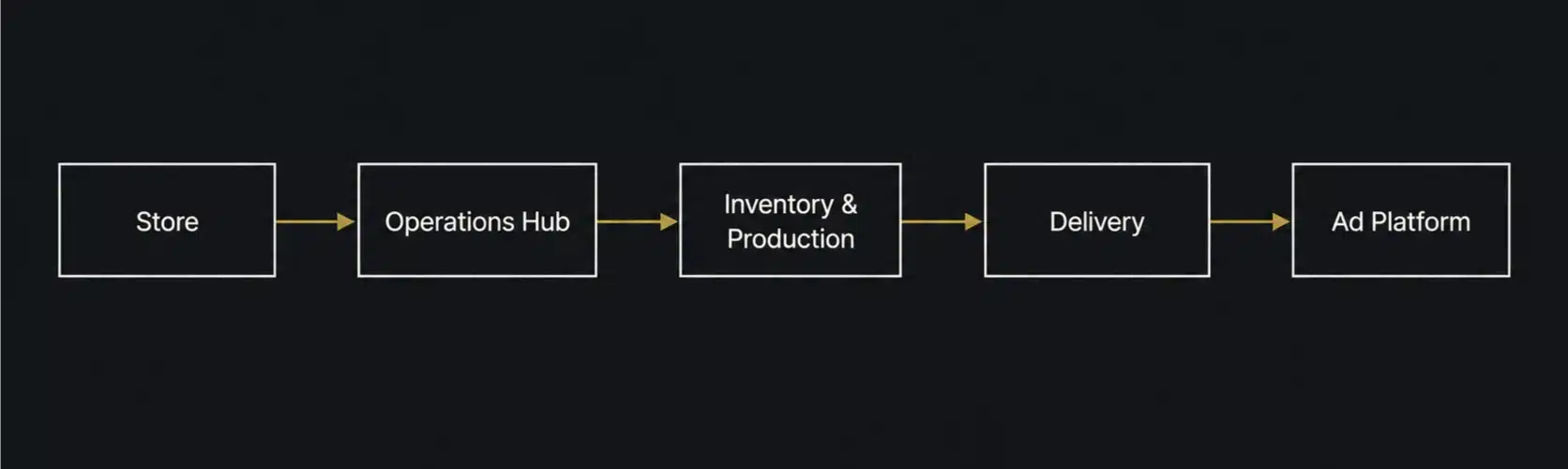
How does the order move through the system?
Stage 1: The order arrives
When an order is placed or updated in the store, it’s sent to the operational hub straight away. The first thing the workflow does is search for the order before creating anything. If the order is already on the board, it’s updated; if it isn’t, it’s created. That sounds like a small detail, but it’s what stops the most common automation failure — the same order appearing twice because an update arrived before the original finished processing, or because a webhook was sent more than once. Each product in the order is broken out as its own line on the board, so the team can see exactly what needs to be made or picked. Products sold as kits are expanded into their components, since the production floor works with components, not the name on the product page. Orders that don’t look right — unusual combinations, missing information, payment questions — are routed to a separate investigation list instead of flowing silently into production. The CRM record for the customer is also updated as the order changes, so sales and customer-care see the same status as operations.
Stage 2: Dispatch dates reach the inventory system
Once the order is on the board, its ship-by and dispatch-by dates are pushed to the inventory and production system. This keeps stock allocation and production scheduling working from the same dates the operations team is looking at, rather than two teams planning against two different calendars.
Stage 3: Production is released from the board
For products made to order, production orders live in the inventory system, but the team manages them from the operational board. When someone changes a production item’s status on the board, the automation releases or voids the matching production order in the inventory system, then writes the result back to the board. That last step matters. If the release fails, the board doesn’t pretend it succeeded. The status the team sees is the status that actually exists in the system of record.
Stage 4: Materials are checked before work starts
Before production begins, the system works out what’s needed. Bill-of-materials requirements are calculated for planned production and grouped by planned date, so the team can see what each day’s work will consume. Each component is compared against on-hand stock, which shows whether a job is actually ready to start or will stall halfway through. Stock adjustments go through a simple approval step: a proposed change is posted to the team’s Slack channel with approve and reject options, and only an approved change updates the stock figure. Stock is one of those areas where an automatic change that’s wrong costs far more than the few seconds a person takes to confirm it.
Stage 5: The picking list is ready before the team arrives
Every morning at 5am, a scheduled workflow gathers the day’s orders and builds the picking list on the board, sorted and ready. The warehouse team starts the day with the work already organised instead of spending the first hour assembling it by hand.
Stage 6: Delivery is scheduled and tracked
Deliveries on the company’s own routes are planned in routing software. The automation regularly pulls the scheduled deliveries and updates the matching orders, processing them in small batches with short pauses between them. The pauses keep the workflow within the routing system’s rate limits, so a busy day doesn’t cause the sync to fail partway through. Larger items go through a pallet carrier network, which has its own system and its own way of reporting delivery status. Both delivery routes feed into the same place, so the operations team doesn’t need to know which carrier an order went with to find out where it is.
Stage 7: The order closes itself when it’s delivered
On an hourly schedule, the automation checks both delivery systems for successful deliveries, finds the matching orders and marks them complete in the store. The customer receives their completion notification, and nobody has to cross-check delivery reports against open orders at the end of the day. When an order is completed, the proof of delivery is retrieved from the delivery system and attached to the order on the operational board. If a customer disputes a delivery weeks later, the evidence is already sitting on the order.
Stage 8: The advertising platform learns what really happened
The final step is the one most businesses never build. When an order is placed or updated, the conversion is recorded for the advertising platform using what happened to the order, not only what the website saw at checkout. A margin-based value is recorded alongside revenue, so campaigns can be optimised towards profitable orders rather than simply large ones. Each order is flagged once its conversion has been sent, so updates don’t cause the same sale to be counted twice. Without that flag, every change to an order would look like a new sale, and the ad platform would optimise towards inflated numbers.
What made it reliable enough to run a business on?
Connecting systems is the easy part. Keeping those connections working every day, through API changes, busy periods and human mistakes, is where most automation projects break down. The patterns that did the most work here were simple: Search before you create. Every workflow that creates a record first checks whether it already exists. This single habit prevents most duplicate-data problems. Write the real result back. When an action happens in another system, its actual outcome is written back to where the team is looking. The board never shows a status the underlying system doesn’t agree with. Process in batches, and slow down on purpose. Large updates are split into small batches with pauses between them, so rate limits and temporary outages affect one small batch rather than the whole run. One bad record doesn’t stop every other update. Retry where a retry can help, and route the rest. Temporary failures like timeouts get automatic retries with a wait in between. Problems a retry can’t fix, such as missing or inconsistent data, are sent to a person instead of being retried until they disappear from view. Flag what has already been done. Anything that must happen exactly once, such as sending a conversion to the ad platform, is marked as done so later triggers skip it. Keep people on the decisions that matter. Releasing production and changing stock are approved by a person. The automation moves the information; it doesn’t make judgement calls it isn’t qualified to make.
What would we tell a business starting this?
Don’t try to build the whole journey at once. This system was built in stages, each one useful on its own. Start with the handoff that costs your team the most time or causes the most mistakes, and make that one reliable first. Decide the source of truth for each type of data before you build anything. Most integration problems come from two systems both believing they own the same information. Stock, order status and delivery status each need exactly one owner. Design for the order that goes wrong, not the one that goes right. Automating a normal order is straightforward. The value is in what happens to the cancelled order, the partly delivered order, the order with the wrong address and the order that arrives twice. Plan for ownership after launch. Systems change. Columns get renamed, APIs get updated and credentials expire. An operational backbone needs someone watching it and fixing it, or it quietly degrades until the team goes back to spreadsheets.
Is this kind of system right for your business?
It’s usually worth looking at if several of these sound familiar:
- The same order information is typed into more than one system
- Someone has to check several tools to answer “where’s my order?”
- Stock figures in different systems regularly disagree
- Orders are completed manually by cross-checking delivery reports
- Your ad platform is optimising on checkout data that doesn’t reflect cancellations or margin
- Your team spends the start of each day preparing work instead of doing it
If only one or two apply, a single well-built integration may be all you need. If most of them apply, the problem isn’t one missing connection. It’s the lack of a connected operational backbone.
Frequently asked questions
What is order processing automation? Order processing automation moves order information between the systems a business uses — the store, operations, inventory, production, delivery and accounting or advertising — without people re-typing it. Each system stays in charge of its own data, and automations keep the others up to date. Do we have to replace our existing software? Usually not. In this project, every system the business already relied on stayed in place. The work was connecting them and deciding which system owns each piece of information. Why use Monday.com as the operational hub? The team needed one place to see and act on every order, and a work-management tool gave them that without forcing them into a heavy ERP interface. The inventory system still owns stock and production data. Monday.com gives the team a clear view of it and a place to make decisions. Why n8n for the automations? The project involved several systems with their own APIs, custom logic around kits and components, and careful handling of batches, retries and duplicates. n8n handled that well while giving us full control over how each workflow behaves when something goes wrong. The right platform depends on the process, though, not the other way round. How long does a system like this take to build? It depends on how many systems are involved and how clean the existing data is. It’s best built in stages: the first valuable integration can often be running within weeks, with the rest of the journey added once that first piece is stable.
Let's talk
Want an outside look at how this could work for you?
Book a free call with Szilard. We'll look at what's actually happening in your setup and tell you straight whether there's something worth fixing.